Existing CaltexGO Customer
Existing CaltexGO Customer
Already using CaltexGO app previously?
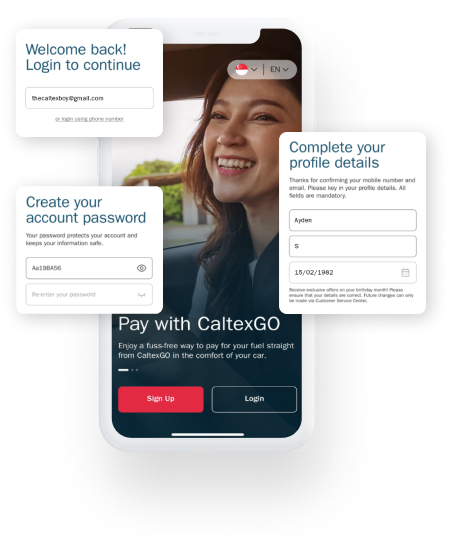
Tap "Login" and enter your mobile number or email on the CaltexGO welcome screen
Step 1: Tap "Login" on the CaltexGO welcome screen.
Step 2: Log in to your account with your registered Email Address used for CaltexGO or Mobile Number. A one-time passcode (OTP) will be sent for verification.
Step 3: Set up your CaltexGO password. This will be your password for logging in to your CaltexGO account.
Step 4: Complete your profile by providing your complete First Name, Last Name and Birth Month & Year.
Note: Only transactions from the last 13 months will be migrated to your account.
Already using CaltexGO app previously?
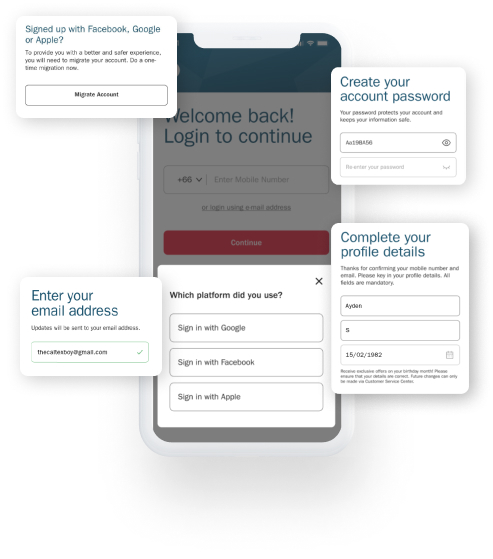
Tap "Login" and enter your mobile number or email on the CaltexGO welcome screen
Step 1: Tap "Login" on the CaltexGO welcome screen.
Step 2: Log in to your account with your registered Email Address used for CaltexGO or Mobile Number. A one-time passcode (OTP) will be sent for verification.
Step 3: Set up your CaltexGO password. This will be your password for logging in to your CaltexGO account.
Step 4: Complete your profile by providing your complete First Name, Last Name and Birth Month & Year.
Note: Only transactions from the last 13 months will be migrated to your account.