




Redeem Linkpoints
Redeem Linkpoints
You can redeem Linkpoints instantly to offset your fuel purchase at any of our Caltex stations.
You can redeem Linkpoints instantly to offset your fuel purchase at any of our Caltex stations.



You can redeem Linkpoints instantly to offset your fuel purchase at any of our Caltex stations.
You can redeem Linkpoints instantly to offset your fuel purchase at any of our Caltex stations.
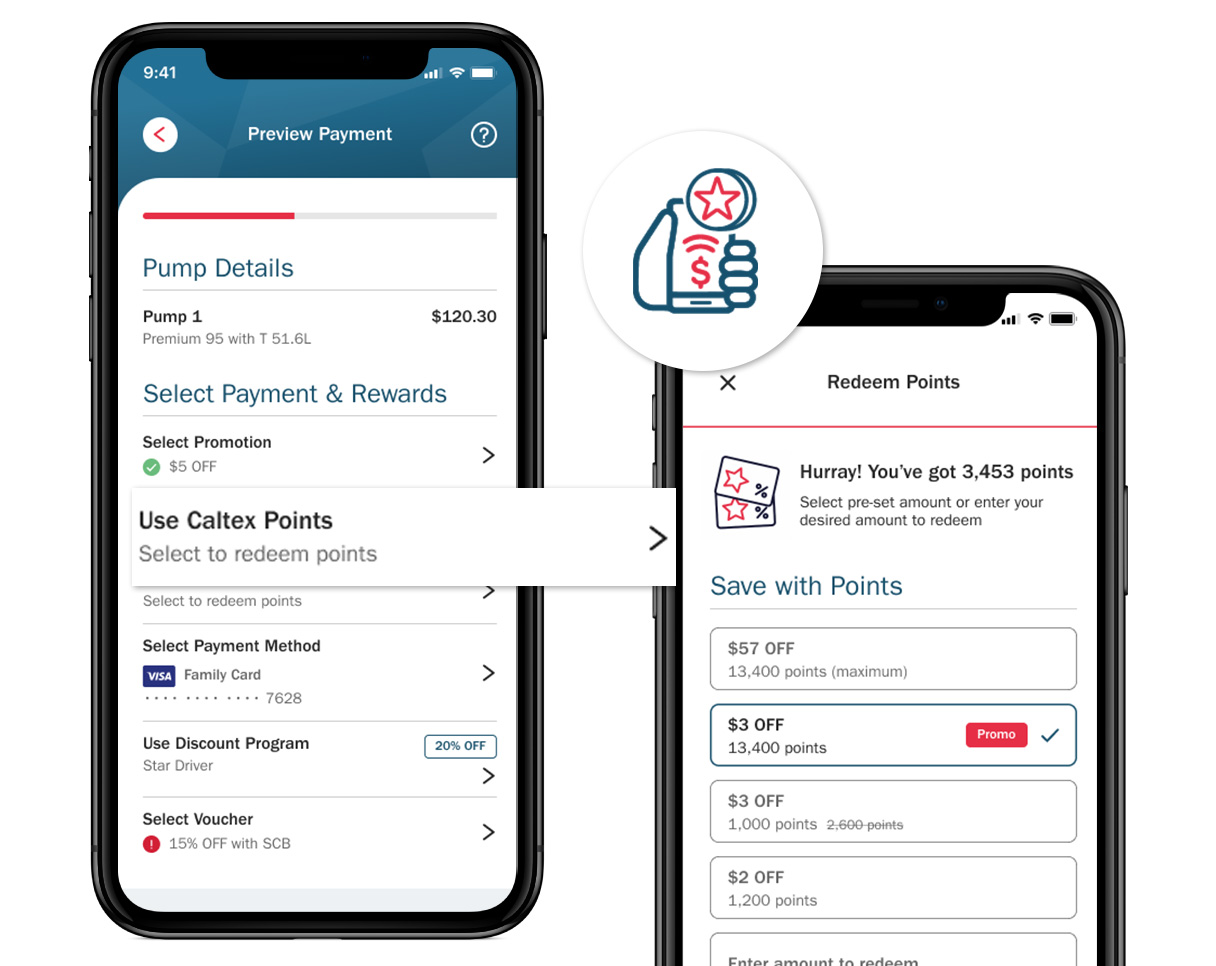
Step 1: Ensure you have linked your Link Rewards if you are redeeming Linkpoints for this fuel transaction.
Step 2: Choose how much points you would like to offset for this transaction. Or you can enter an amount to redeem.
Step 3: Tap on the "Done" button at the bottom and return to Preview Payment screen to complete your payment.
Step 1: Ensure you have linked your Link Rewards if you are redeeming Linkpoints for this fuel transaction.
Step 2: Choose how much points you would like to offset for this transaction. Or you can enter an amount to redeem.
Step 3: Tap on the "Done" button at the bottom and return to Preview Payment screen to complete your payment.
Whenever you purchase Techron® fuel via CaltexGO at any Caltex service station in Singapore you earn Linkpoints. Once you've accumulated enough points, you may redeem them instantly for fuel upon check out in the payment summary screen of the CaltexGO app. 100 Linkpoints = $1
For redemption of Linkpoints via CaltexGO, points will be redeemed based on the gross fuel purchase amount followed by card promotions or discounts (if any).
Every litre of Techron® fuel you pump at Caltex earns you 2 Linkpoints. Remember to onboard your Link Rewards Card on the drop down menu in the 'Loyalty Program' tab on the "My Account" page in the CaltexGO app to earn your Linkpoints for your fuel purchase.
After fuelling your vehicle, proceed to the payment summary screen. You will be given an option to redeem your existing Linkpoints for your fuel purchase. Redeem your Linkpoints for fuel by selecting "Use Link Rewards Points." and selecting the amount of Linkpoints you would like to redeem. Click the 'Done' button once you've chosen your desired redemption amount.
You may log in to your online account to view your Linkpoints balance and transactions. If you do not have a Link online account, register for one here.
CaltexGO mobile payments are accepted across all Caltex service stations in Singapore.
Download the CaltexGO app and use the “Mobile Pay” option to pay for fuel. If a discount is applicable, it will be automatically applied and displayed on the payment confirmation screen once you have entered the pump number.
Not yet. You can continue to use your Safra and Cabbie 21 cards in-store.
After you have completed refuelling, slide to the right pump number and tap "Continue". Redeem your Linkpoints for fuel by selecting "Use Link Rewards Points." and selecting the amount of Linkpoints you would like to redeem.
Updates will be processed within 48 hours of your transaction.
If you have not paid for the transaction, tap the "Back" button to reselect the correct pump number. If issues persist, please proceed to the cashier in-store to settle the transaction in person.
You have 90-seconds to complete a Mobile Pay transaction before it is time-out. If you need more time, please proceed to the cashier in-store to complete the transaction.
No. You will receive a digital receipt in the CaltexGO app, as well as an electronic receipt in the form of a tax invoice via your registered email address.
No. CaltexGO’s Mobile Pay is limited to fuel purchases.
Your past transaction receipts can be viewed at any time via the CaltexGO app. To view a past transaction, log in to your app account and select ‘Activity'. Your receipts will be organized by date, with your most recent transaction at the top of the list. Tap "See all" and select the transaction to display details.
For a tax invoice receipt, refer to your registered email account. Remember to check your junk folder for <receipt@caltexgo.com> if you cannot find them.
Fuel prices are displayed at each pump island dispenser.
In this unlikely event, you will still be required to pay for any fuel dispensed into your vehicle in-store prior to leaving the Caltex station. If this occurs, please seek help from Caltex at SGsupport@caltexgo.com
As fuel has been dispensed you are liable for payment. Please proceed in-store to settle the payment.
Caltex reserves the right to refer the matter to the local police authority in the event transactions carried out via the CaltexGO account appear suspicious or indicates numerous declined transactions.
A ‘Preview Payment’ screen will prompt you to verify your transaction before you proceed to pay. You will see a ‘Payment Success’ screen to confirm payment has been made. You may only leave the site once you see this screen.
Like most apps, CaltexGO uses your smartphone’s location services and internet data. Costs vary depending on your network provider and mobile phone plan. Contact your mobile service provider for more information.
No
CaltexGO only uses the location services in your mobile’s native operating system when the app is running to determine your Mobile Pay location. The app will not be able to determine your location if it is not open.
Caltex uses a variety of security technologies and procedures for storing and securing personal information and complies with applicable data privacy regulations.
We work with our service providers and vendors (such as payment processers and fraud prevention services) to ensure that each of them maintains appropriate physical, technical and infrastructural security measures to secure your personal data.
For example, an SMS verification code, as well as an email confirmation link, is sent to the user when first setting up the CaltexGO Mobile Pay account, for added security. Users are advised to assign a security passcode to protect your personal data on your phone.
Yes, you can log in to your CaltexGO account from another device provided the transaction is still available. Alternatively, you can go in-store to make a payment.
You must immediately notify the CaltexGO Support Team via SGsupport@caltexgo.com to request CaltexGO account cancellation or temporary suspension.
Please contact your bank immediately if you suspect your card has been used in an unauthorized manner.
You must also contact CaltexGO Support Team immediately via SGsupport@caltexgo.com to report this issue. Otherwise, you will have to bear the cost of any transactions made prior to the notification.
Please email the CaltexGO Support Team via SGsupport@caltexgo.com
Send us your queries via our Feedback Form.
Mobile phone use remains a source of distraction, with increased personal safety risks from unpredictable vehicular traffic on the forecourt. For your safety, customers must be mindful of their surroundings and focus on the refueling task at hand. As such, the CaltexGO app is only permitted inside an enclosed stationary vehicle or when inside the convenience store.
There is no change to the safety requirements at the service station. After you have switched off your vehicle’s engine, you can use your phone when you’re inside an enclosed stationary vehicle or when you are inside the convenience store. It is also recommended that your phone be disconnected from any related accessories, such as a power bank or phone charger, while using the CaltexGO app.
It is safe to use a mobile phone from inside your enclosed car on a forecourt, but not outside the vehicle (unless you are inside the convenience store). This helps eliminate the risk of your phone being a source of distraction on a busy forecourt.
For safety, please keep your phone in the vehicle when you're filling up. To avoid the risk of your phone being a source of distraction, DO NOT USE your phone outside your vehicle while on the forecourt.
For safety reasons, the CaltexGO app and mobile phones can only be used inside an enclosed stationary vehicle or inside the convenience store. Motorcyclists who are keen to experience Mobile Pay may only proceed with CaltexGO fuel transactions in-store.
For safety reasons, motorcyclists are unable to use mobile phones on motorbikes. Phones can only be used inside an enclosed vehicle or inside the convenience store.
We require your roof to be up prior to using the mobile phone. Alternatively, you may proceed to the convenience store.


CaltexGO Terms of Use and Privacy Statement