







Caltex TNG Cashback Promo
Fuel Up RM40, Get RM20 Rewards

CaltexGO Big Bang Rewards


  • Validity:

    Till 31 Mar 2026
  • Participating Stations:

    Find Us

IT'S YOUR CHANCE TO SCORE BIG!

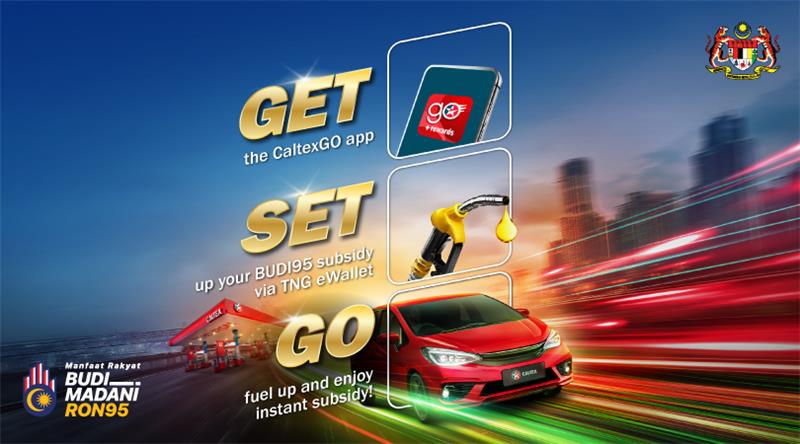
Ready for a fueling experience that's faster, smarter and more rewarding?

Now you can pay using Touch 'n Go eWallet in the CaltexGO app and get up to RM20* cashback. 

It's quick, easy and rewarding for every drive!
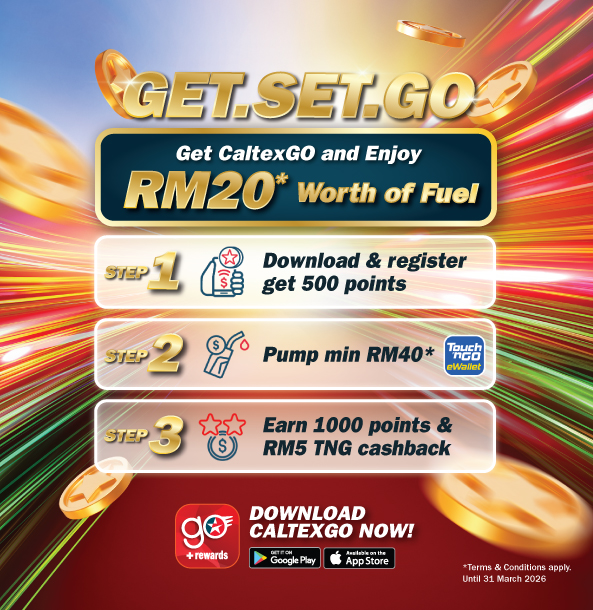
Ready for a fueling experience that's faster, smarter and more rewarding?

Now you can pay using Touch 'n Go eWallet in the CaltexGO app and get up to RM20* cashback. 

It's quick, easy and rewarding for every drive!
Download App

SIGN UP NOW FOR BIG REWARDS

Kickstart your journey with CaltexGO and enjoy irresistible fuel points and cashback rewards. It's the perfect way to start your drive with a Big Bang! 

Kickstart your journey with CaltexGO and enjoy irresistible fuel points and cashback rewards. It's the perfect way to start your drive with a Big Bang! 

Download App

ALREADY ON CALTEXGO? ENJOY RM5 CASHBACK INSTANTLY!

Enjoying the convenince of CaltexGO?

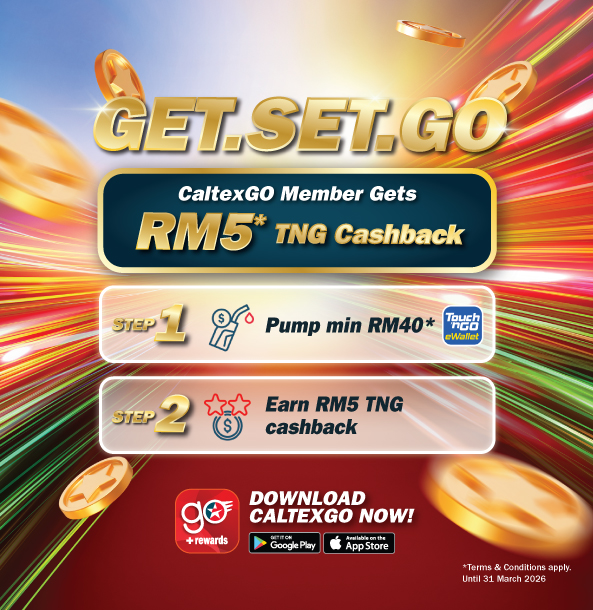
Now get rewarded when you spend a minimum of RM40 on RON95 or RON97 via CaltexGO and receive RM5 Touch ’n Go eWallet cashback.

It’s our way of saying thank you for fueling smarter with us.

Enjoying the convenince of CaltexGO?

Now get rewarded when you spend a minimum of RM40 on RON95 or RON97 via CaltexGO and receive RM5 Touch ’n Go eWallet cashback.

It’s our way of saying thank you for fueling smarter with us.

Link TNG eWallet

An electronic receipt for all CaltexGO transactions will be delivered to your registered email address.

Yes. You are required to confirm your email address before using CaltexGO for mobile payment.

Caltex takes user security seriously, which is why you are sent a one-time security code by SMS to validate credit card selection when you first set up your preferred payment card.

You can request to have another authorization SMS sent. If you still do not receive the SMS after a few minutes, please contact your issuing bank for clarification.

Try removing the credit card details from the app and adding it again, double-checking to ensure all required information has been entered correctly.


If you continue to receive a payment error, contact your bank to verify that your payment account is active and verified internationally.

Any device running on Apple iOS 12/Android 5.1.1 or later.

CaltexGO is available on Apple and Google Play App stores

Yes. You need to register to create a CaltexGO account to enjoy the mobile app features. If you have yet to do so, follow the on-screen prompts.

Yes. You can purchase both Petrol and Diesel.

No. CaltexGO is currently limited to fuel purchases at the participating Caltex stations. 

A 3G or better signal is required to use the mobile payment service. Remember to check that your GPS is connected, or ‘Location Services’ has been enabled.


If you’re still having trouble with your service signal, you can always pop into the shop and pay for fuel, as usual. 

CaltexGO mobile payments are only available at selected Caltex service stations nationwide.

Download the CaltexGO app and use the “Mobile Pay” option to pay for fuel. If a discount is applicable, it will be automatically applied and displayed on the payment confirmation screen once you have entered the pump number.

If you have not paid for the transaction, tap the "Back" button to reselect the correct pump number. If issues persist, please proceed to the cashier in-store to settle the transaction in person.

You have 90-seconds to complete a Mobile Pay transaction before it is time-out. If you need more time, please proceed to the cashier in-store to complete the transaction.

You will receive a digital receipt in the CaltexGO app, as well as an electronic receipt in the form of a tax invoice via your registered email address. A paper receipt in store is available upon request.

No. CaltexGO’s Mobile Pay is limited to fuel purchases.

Your past transaction receipts can be viewed at any time via the CaltexGO app. To view a past transaction, log in to your app account and select ‘Transactions'. Your receipts will be organized by date, with your most recent transaction at the top of the list. Tap each transaction to display details.


For a tax invoice receipt, refer to your registered email account. Remember to check your junk folder for <receipt@caltexgo.com> if you cannot find them.

Fuel prices are displayed at each pump island dispenser.

In this unlikely event, you will still be required to pay for any fuel dispensed into your vehicle in-store prior to leaving the Caltex station. If this occurs, please contact our Customer Service Center at 1800 88 3188 or email to myhqcsc@chevron.com

As fuel has been dispensed you are liable for payment. Please proceed in-store to settle the payment.


Caltex reserves the right to refer the matter to the local police authority in the event transactions carried out via the CaltexGO account appear suspicious or indicates numerous declined transactions.

A ‘Pay Now’ screen will prompt you to verify your transaction before you proceed to pay. You will see a ‘Successful’ screen to confirm payment has been made. You may only leave the site once a “Payment Received” notification is displayed.

Yes, pre-authorization applies for both credit and debit card payment via CaltexGo app. For every fuelling transaction; full tank or specific amount, a temporary hold applied to both credit and debit card. This hold lasts for up to 5 business days and involves specific amount of the available balance of the card. For more information, please contact your respective issuer banks.

Select ‘TNG eWallet’ payment method on pump selection screen and press Confirm.

Yes, there will be pre-authorisation based on your preset/full tank amount. If you underfill, the balance amount will be refunded upon completion of fueling by confirming the payment. For BUDI95, the pre-authorization amount will be based on pump price and the refund will be based on difference with the final amount pumped.

Confirm the payment after refueling. If you did not confirm, please wait for the refund within 24 hours. If still did not get your refund, please report to myhqcsc@chevron.com

You can reload the balance within TNG eWallet app during the transaction. Upon reload, you can proceed with fueling.