









VIEW DETAILS
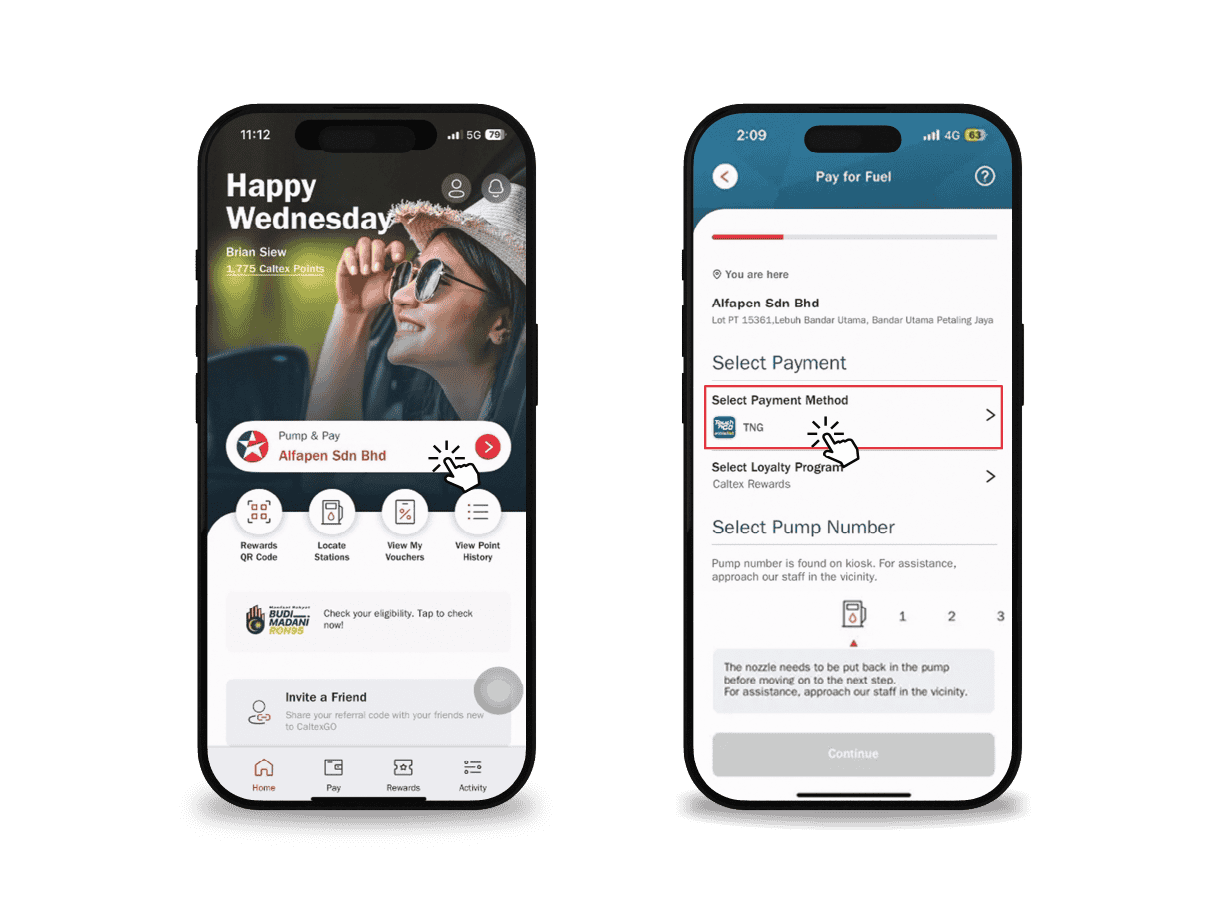
1. Select TNG eWallet Payment Method
Step 1: On CaltexGo homepage, press Pump & Pay button
Step 2: Select TNG eWallet payment method
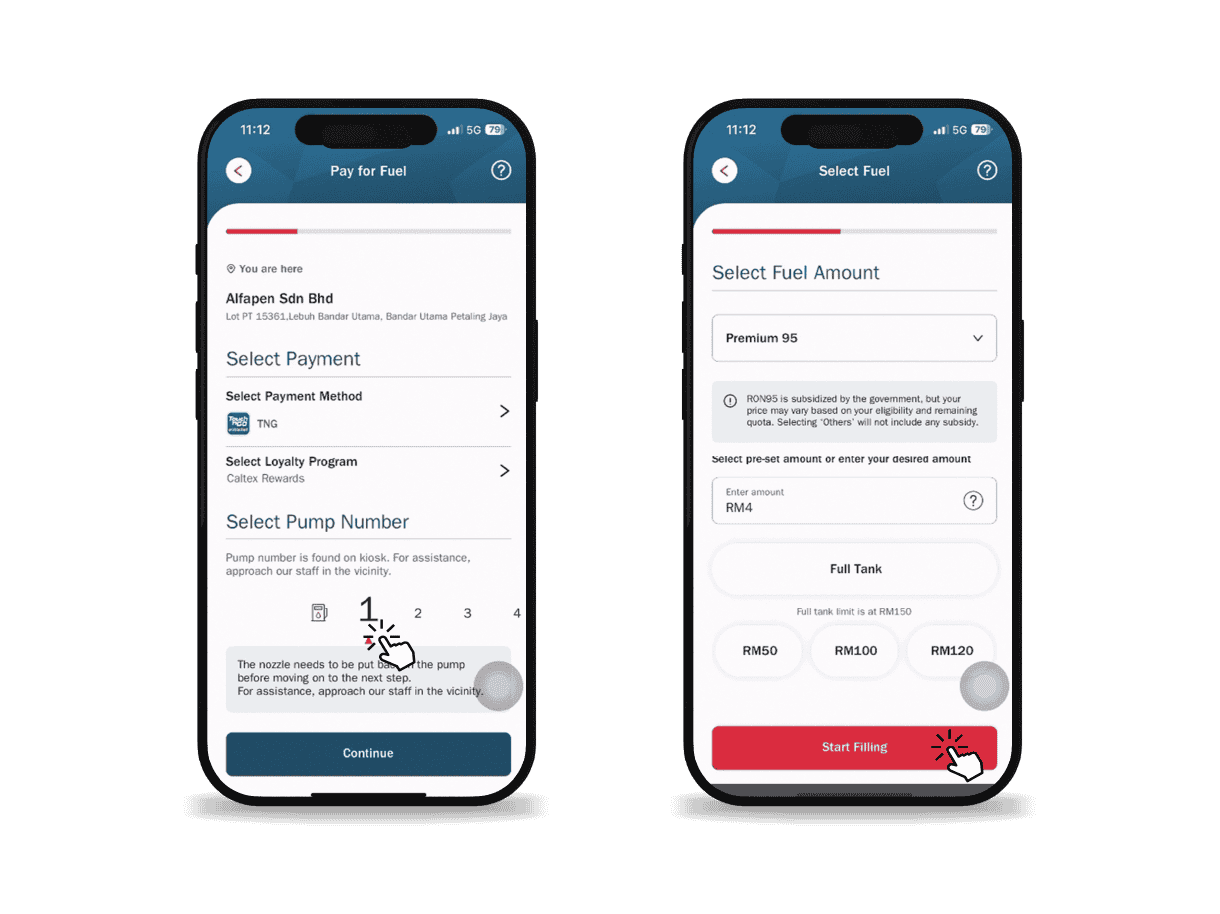
2. Pay via TNG eWallet
Step 3: Select pump number & press Continue
Step 4: Input/Select amount & press Start Filling
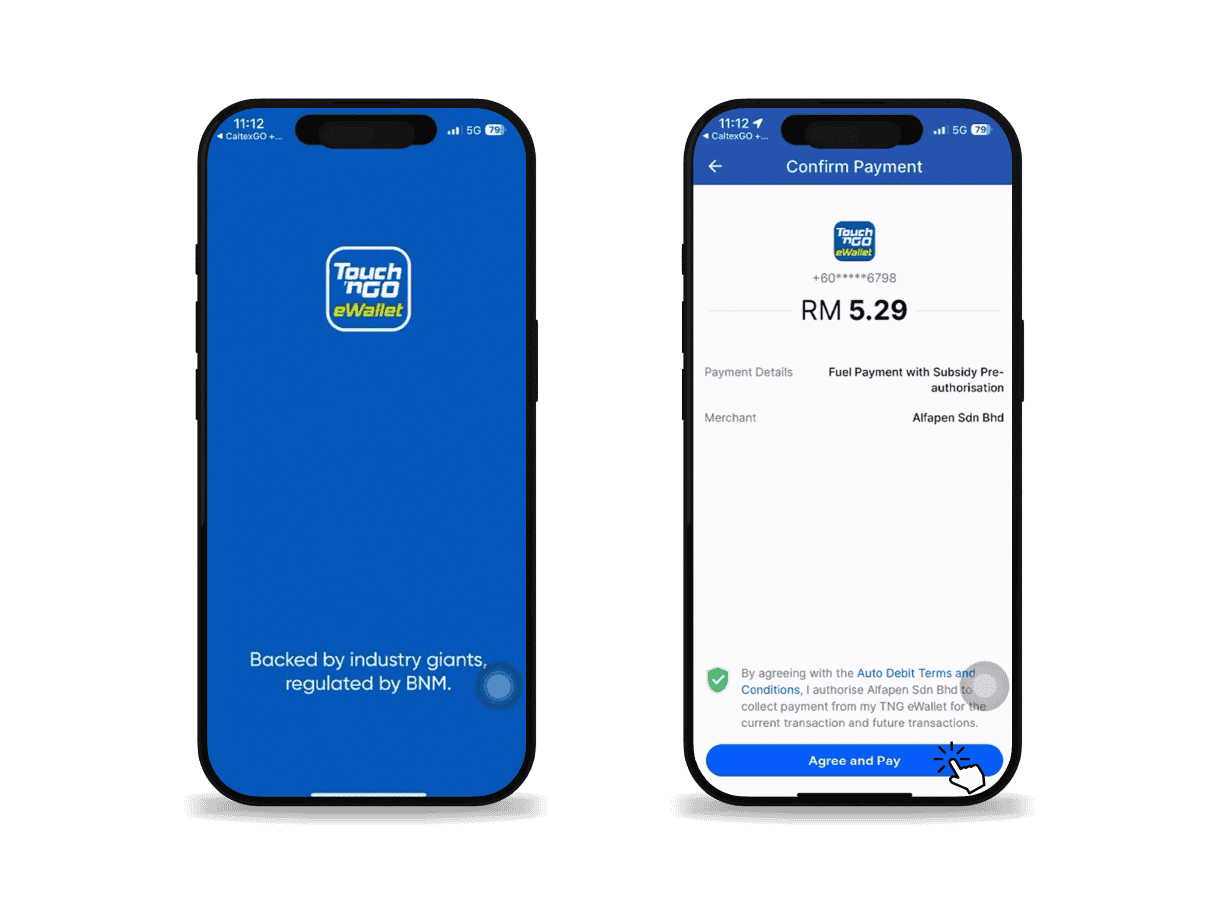
3. Pay & Start Filling
Step 5: Directed to TNG eWallet app to confirm pre-authorization amount, press Agree and Pay & start fueling
Step 6: Pre-authorization amount will be displayed during fueling. Once fueling is completed, press Pay at Preview Payment screen. Once payment is confirmed, the remaining of pre-authorization amount will be refunded immediately
What phones are compatible with the Caltex app?
Any device running on Apple iOS 12/Android 5.1.1 or later.
Where can I download the CaltexGO app?
CaltexGO is available on Apple and Google Play App stores
Do I need to register?
Yes. You need to register to create a CaltexGO account to enjoy the mobile app features. If you have yet to do so, follow the on-screen prompts.
Can I use the CaltexGO app to purchase any fuel type?
Yes. You can purchase both Petrol and Diesel.
Can I use the CaltexGO app to purchase convenience store products?
No. CaltexGO is currently limited to fuel purchases at the participating Caltex stations.
My phone has no signal. What should I do?
A 3G or better signal is required to use the mobile payment service. Remember to check that your GPS is connected, or ‘Location Services’ has been enabled.
If you’re still having trouble with your service signal, you can always pop into the shop and pay for fuel, as usual.
Why do I need to register my email for Mobile Pay?
An electronic receipt for all CaltexGO transactions will be delivered to your registered email address.
Will I receive an email confirmation?
Yes. You are required to confirm your email address before using CaltexGO for mobile payment.
What is the SMS authorization code?
Caltex takes user security seriously, which is why you are sent a one-time security code by SMS to validate credit card selection when you first set up your preferred payment card.
What if I don’t receive my SMS authorization code?
You can request to have another authorization SMS sent. If you still do not receive the SMS after a few minutes, please contact your issuing bank for clarification.
There’s an error adding a payment method
Try removing the credit card details from the app and adding it again, double-checking to ensure all required information has been entered correctly.
If you continue to receive a payment error, contact your bank to verify that your payment account is active and verified internationally.
How can I pay using TNG eWallet on CaltexGO app?
Select ‘TNG eWallet’ payment method on pump selection screen and press Confirm.
Is there any pre-authorisation?
Yes, there will be pre-authorisation based on your preset/full tank amount. If you underfill, the balance amount will be refunded upon completion of fueling by confirming the payment. For BUDI95, the pre-authorization amount will be based on pump price and the refund will be based on difference with the final amount pumped.
What if I did not get my pre-authorization refund?
Confirm the payment after refueling. If you did not confirm, please wait for the refund within 24 hours. If still did not get your refund, please report to myhqcsc@chevron.com
What if my TNG eWallet balance insufficient during the process of fueling up?
You can reload the balance within TNG eWallet app during the transaction. Upon reload, you can proceed with fueling.
Why can’t I use my mobile phone on the forecourt?
Mobile phone use remains a source of distraction, with increased personal safety risks from unpredictable vehicular traffic on the forecourt. For your safety, customers must be mindful of their surroundings and focus on the refueling task at hand. As such, the CaltexGO app is only permitted from inside a stationary vehicle or when inside the convenience store.
Can I use my phone at a petrol station?
There is no change to the safety requirements at the service station. After you have switched off your vehicle’s engine, you can use your phone when you’re inside a stationary vehicle or when you are inside the convenience store. It is also recommended that your phone be disconnected from any related accessories, such as a power bank or phone charger, while using the CaltexGO app.
How can I use the app if I can’t use my phone at the pump?
It is safe to use a mobile phone from inside your car on a forecourt, but not outside the vehicle (unless you are inside the convenience store). This helps eliminate the risk of your phone being a source of distraction on a busy forecourt.
What should I do with my phone while refueling?
For safety, please keep your phone in the vehicle when you're filling up. To avoid the risk of your phone being a source of distraction, DO NOT USE your phone outside your vehicle while on the forecourt.
Can anyone use the CaltexGO app?
For safety reasons, the CaltexGO app and mobile phones can only be used from inside a stationary vehicle or inside the convenience store. Motorcyclists who are keen to experience Mobile Pay may only proceed with CaltexGO fuel transactions in-store.
Why can’t I use the CaltexGO app for my motorbike?
For safety reasons, motorcyclists are unable to use mobile phones on motorbikes. Phones can only be used from inside a vehicle or inside the convenience store.
Can I use CaltexGO if I drive a convertible?
We require your roof to be up prior to using the mobile phone. Alternatively, you may proceed to the convenience store.